
 |
 |
 |
 |
 |
 |
 |
 |
 |
 |
 |
 |
 |
 |
 |
 |
 |
 |
 |
 |
 |
 |
 |
 |
 |
 |
 |
 |
 |
 |
Flexing the V3iI've yet to see any important flexes for the V3i yet as its market penetration in the United States is probably 0% as far as cell phones go. That will change once Cingular and T-Mobile officially sell this phone domestically. There are a couple of flexes released by those in the modding community of their personal phones but nothing of the caliber of a Motorola or Cingular official release so I would stick with a monster pack for your phone instead. But in an effort to be thorough, I've tried one of these personal flexes to demonstrate how this is done.There are a couple types of flexes at MotoX. There is the "flex" (the original factory default one in .hs file format), and the "flexlash" (a flex which comes in the .shx file format). As with the flash file, just get the most recent flex you can. In the image below I used a flex file. You can see by the file name that it is flex version "GSPSLQAT675UR056". Launch RSD Lite. Then connect your phone to the data cable. Your phone should be detected shortly by the program and display the first line of text you see in the screen shot below. Click the button labeled "..." and find where the flex is on your computer that you want to use. Click the "Start" button. Now you should see what's displayed on the second and third lines. When it's finished you will see the line of text on the last line displayed. Click the "Close" button and you are done. Disconnect your phone from the cable and check it out. 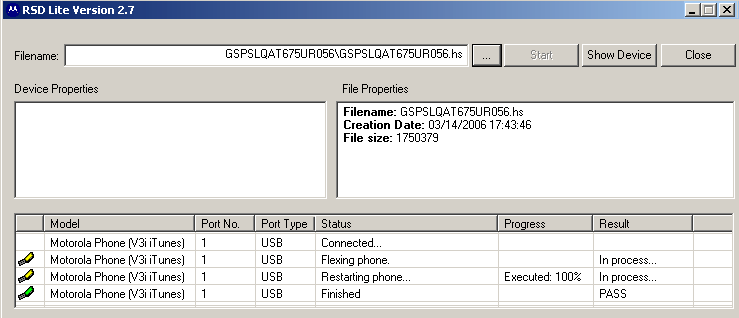
After it's finished and your phone has given you a confirmation tone, you can click "Close" and disconnect your phone from the cable and check out your changes. If you should get a message like this where the program seems to hang: 
Don't panic. Just close the program, chance are your phone is just fine. Sometimes this happens. |
|
I learned how to flex this phone from MotoX at his tutorial
right here.
This ends the "flex" section of this tutorial. 

|
|
|
|
|
|
|
|
|
|
|
|
|
|
|
|
|
|
|
|
|
|
|
|
|
|
|
|
|
|
|